
Installments in Egypt
Pay for your program in monthly installments
If you are in Egypt, you can split the fees of any ABA 4 Change program in two ways: with a credit card from a participating bank, or through valU with no card needed. This guide shows every step exactly as it appears on the checkout page.
Choose the option that fits you:

Credit card installments
You have a Visa or Mastercard credit card from a participating Egyptian bank, and your order is EGP 2,000 or more.
Installments with valU
No credit card? Pay from the valU account registered to your mobile number and confirm with a code sent to your phone.
Option 1
Installments on your bank credit card
Installments are available on eligible credit cards issued in Egypt by these banks:










The list of banks and plans may change. The plans available for your card appear automatically as soon as you type its number at checkout.
Before you start, check that:
- Your card is a credit card (Visa or Mastercard) from one of the banks above, and your bank allows installments on it.
- Your order total is EGP 2,000 or more.
- The card is enabled for online purchases.
The steps at checkout
1
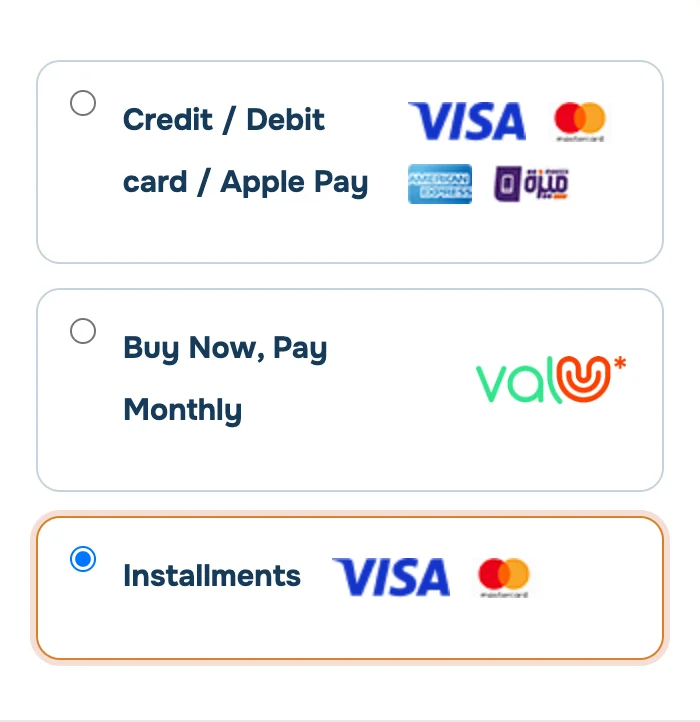
Choose “Installments”
After filling in your billing details, scroll to the payment methods and choose “Installments” instead of “Credit / Debit card”.
2
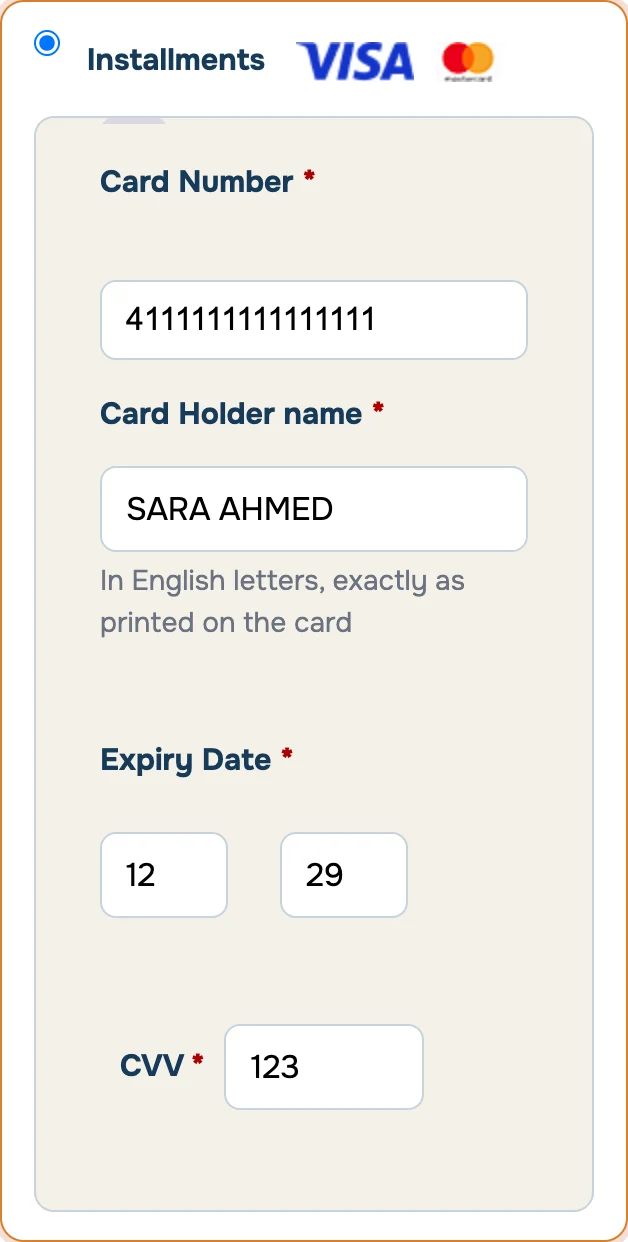
Enter your card details
Type the card number, the cardholder name exactly as printed on the card, the expiry date (month, then year) and the 3-digit CVV on the back of the card.
3
Pick the number of months
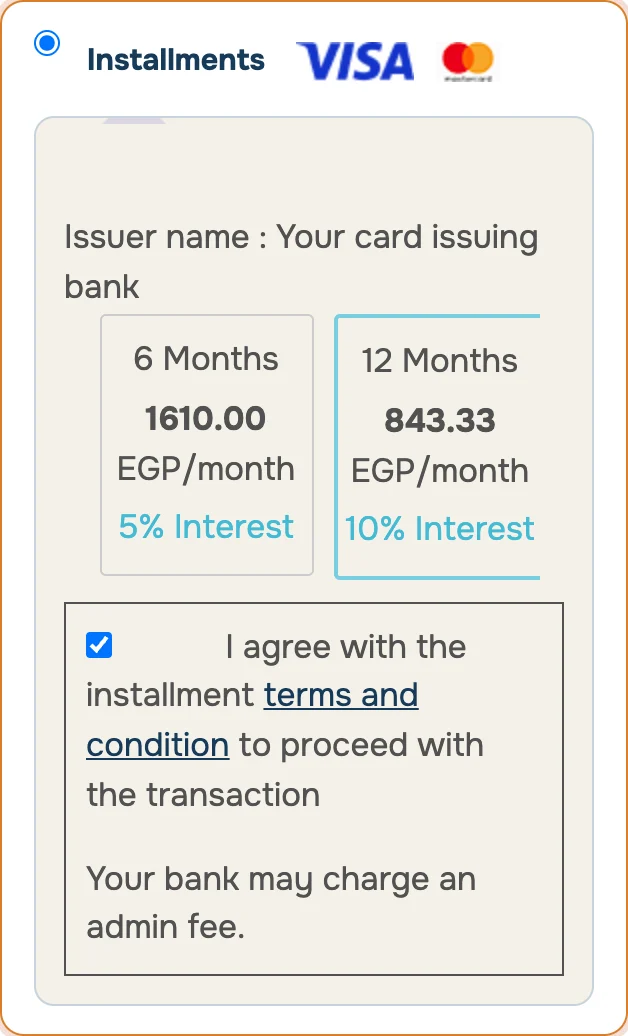
Once the card number is in, your bank’s plans appear: number of months, monthly amount and interest rate. Pick the plan that suits you, then tick the box to accept the installment terms.
No plans showing? The card is probably not eligible for installments, or the order is under EGP 2,000. Try valU, or contact us.
4
Complete the payment
Accept the terms and conditions and press “Place order”. Your bank may ask for a verification code sent by SMS. Once the payment goes through, you receive your order confirmation by email.
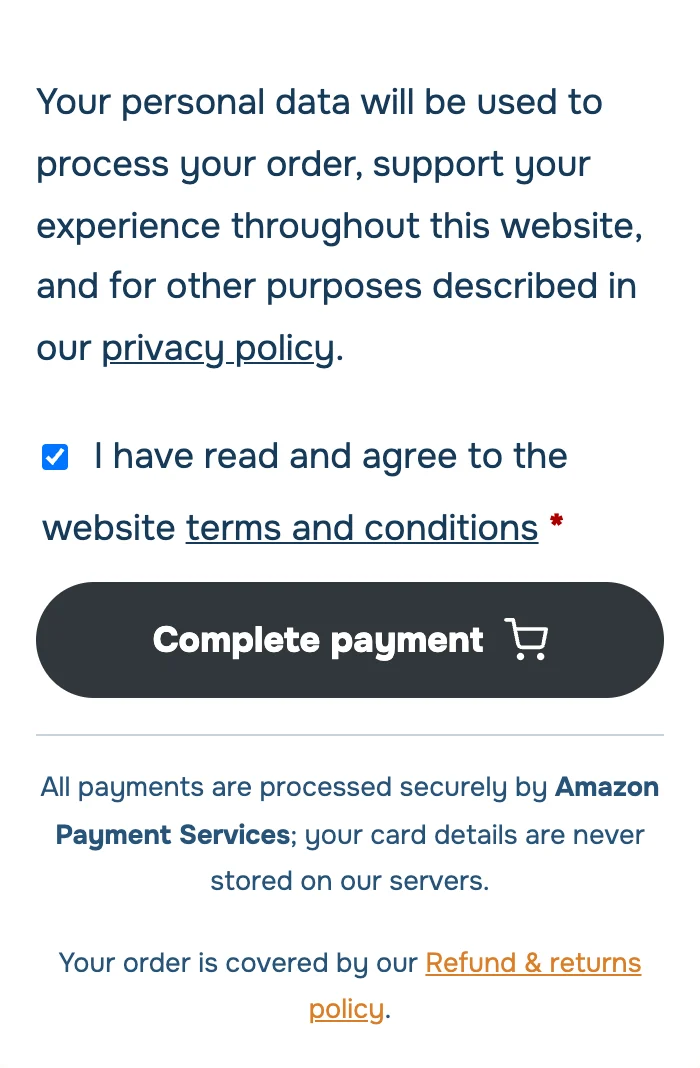
The amounts in these screenshots are examples only. At checkout you see your own bank’s plans and interest rates.
Option 2
Installments with valU
valU is a “buy now, pay later” service in Egypt. All you need is an active valU account with available credit, registered to your mobile number. No bank card is needed.
No account yet? Download the valU app and sign up first, then come back to check out.
1
Choose valU
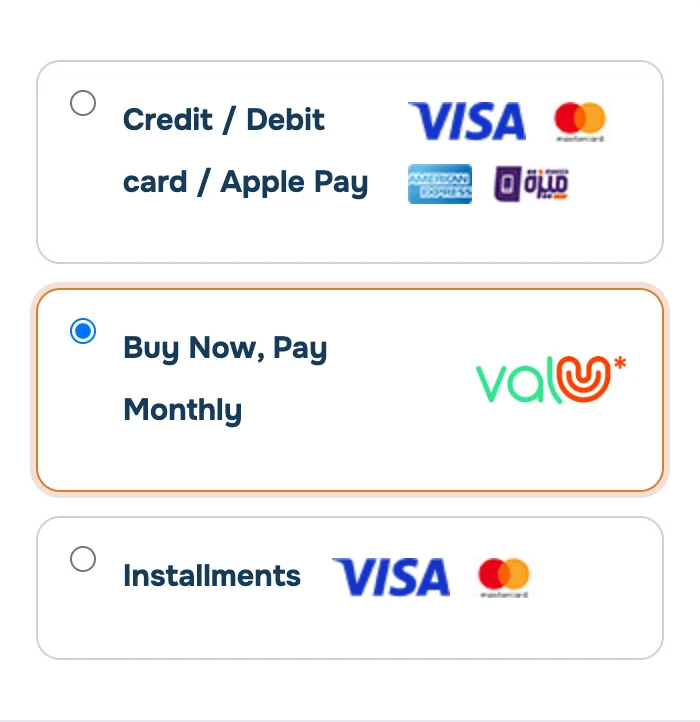
In the payment methods, choose “Buy Now, Pay Monthly” next to the valU logo.
2
Enter your mobile number and request the code
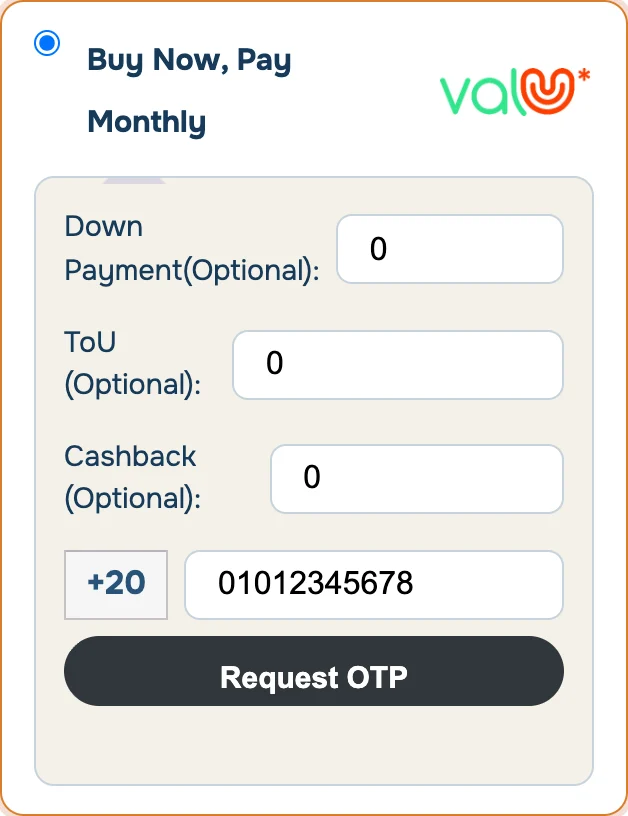
Type the mobile number registered with valU, then press “Request OTP”. Down payment, ToU gift card and cashback are optional; leave them at 0 if you don’t need them.
3
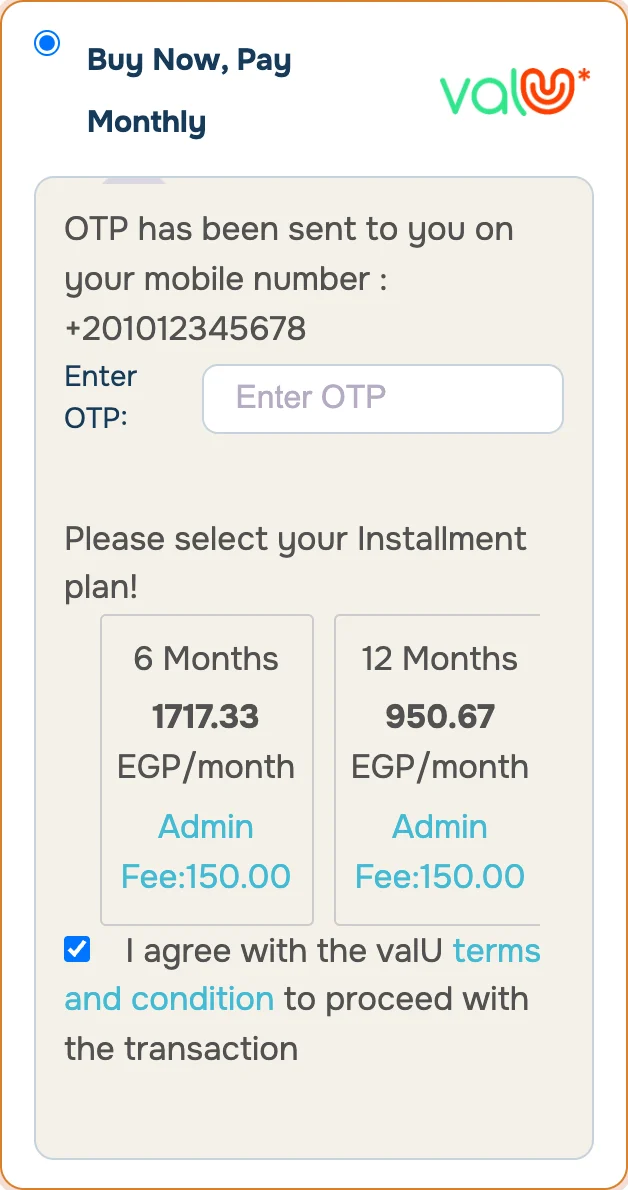
Enter the verification code (OTP)
valU sends a code to your phone by SMS. Type it into the “Enter OTP” box, and the plans available on your account appear.
No code? Check that the number is the one registered with valU, and wait a minute before requesting it again.
4
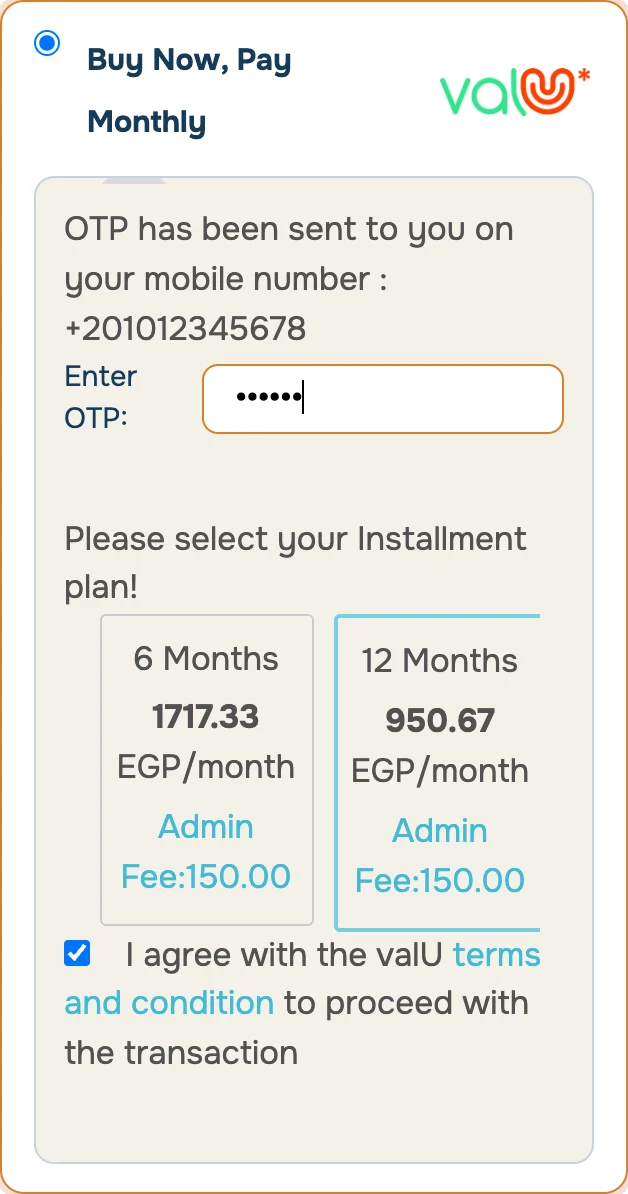
Choose your plan
Pick the number of months; each plan shows the monthly amount and the admin fee. Then tick “I agree with the valU terms and condition”.
5
Complete the payment
Accept the terms and conditions and press “Place order”. You receive your order confirmation by email, and the installments show up in your valU app.
The amounts in these screenshots are examples only. At checkout you see the actual plans on your valU account.
Before you pay
Good to know
You pay in Egyptian pounds
Checkout amounts are in EGP, and you see the monthly amount before you confirm.
Your bank or valU sets the interest
The interest rate or admin fee is shown on every plan before you choose it, under your bank’s or valU’s terms.
Secure payment
All payments are processed by Amazon Payment Services, and your card details are never stored on our servers.


FAQ
Questions about installments
Can I pay any program in installments?
Credit card installments are available on any order of EGP 2,000 or more. We set no minimum for valU, though valU may apply its own limits to your account.
Can I use installments from outside Egypt?
No. Bank installments work only with cards issued by participating Egyptian banks, and valU only serves customers in Egypt. From outside Egypt you can pay by card in one payment, and some programs also offer a split payment option in the pricing section of the program page.
My bank is listed but no plans show up. Why?
The most common reasons: it is a debit or Meeza card rather than a credit card, your card type is not part of the bank’s installment program, or the order is under EGP 2,000. You can check with your bank, or use valU instead.
Who sets the interest and fees?
Your card’s issuing bank, or valU. The interest rate or admin fee is shown on each plan at checkout before you confirm.
Are my card details safe?
Yes. Payments are processed by Amazon Payment Services, and your card details are never stored on ABA 4 Change servers.
What if I need a refund?
All orders follow our refund policy. The money goes back through the same payment method, and the installments are settled under your bank’s or valU’s terms.
Questions about paying or installments?
Message us on WhatsApp before you pay, and we will help you pick the right option.